The Data tab
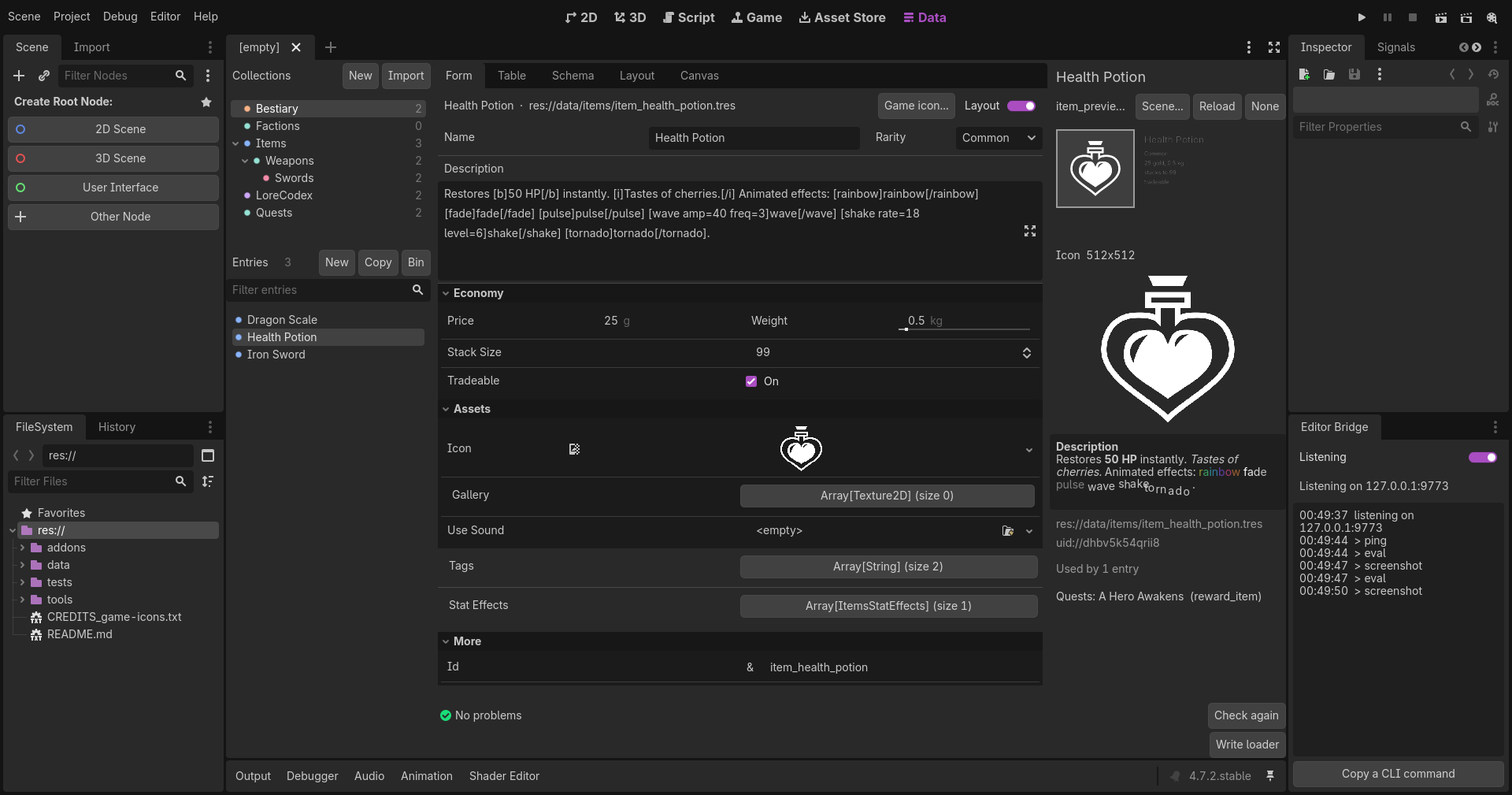
Left, the collections and the entries of the one picked. Centre, five views of that collection: Form, Table, Schema, Layout, Canvas, with the Problems panel under them and a status line. Right, the Stage. The tab is a main screen like 2D and 3D, so the Inspector dock and the FileSystem dock stay where they are.
Left: collections and entries
Collections lists every collection as a tree: a class that extends another, or whose folder sits inside another's, nests under it. Each row starts with a dot in the collection's colour, the one its canvas box and its thumbnails wear, and ends with its entry count, dimmed; when the validator has found something, a badge with the number of problems sits between, red when one is an error. The tree is as tall as its rows, and the entries below take the rest of the column. A click picks the collection.
- New makes a collection: a name, a folder, and a class with an id and a name field. See Getting started.
- Import brings a DaelokBase Classic project in. See Import and export.
- The folder button chooses the folders scanned for resources of classes of your own, or Scan all. The Data tab asks once, the first time it opens in a project that has some. See Getting started.
- Pictures dragged from the FileSystem dock onto a collection, or onto its entry list, become entries: one a picture, in the collection's first picture field (or its first list of pictures), named after the file, the key made by the id mode.
- A right-click on a collection offers Hide: it goes into a folded Hidden group at the bottom, with the collections nested in it, and leaves the canvas and the Problems panel. Show brings it back, and Show all on the Hidden group brings back every one.
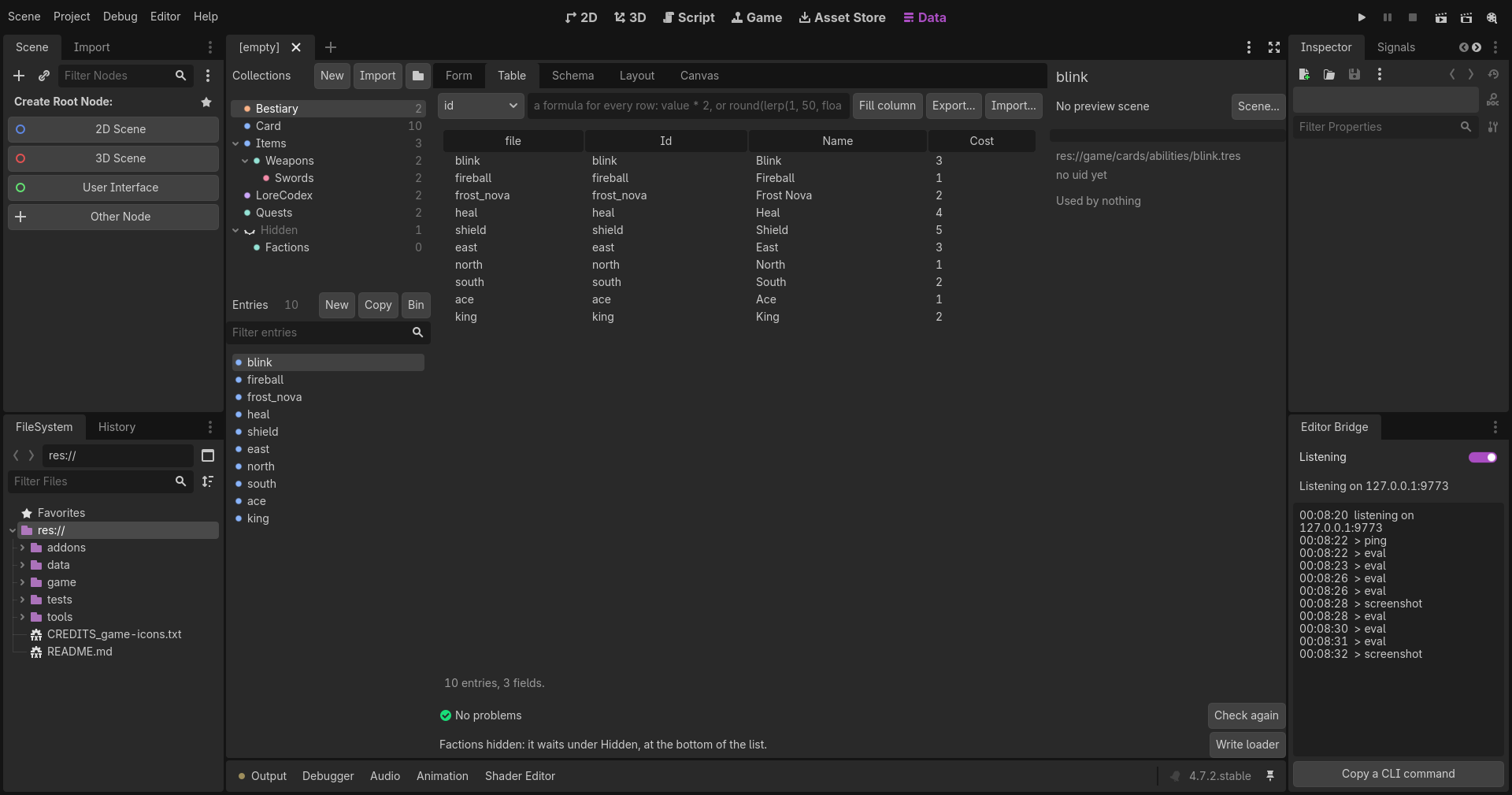
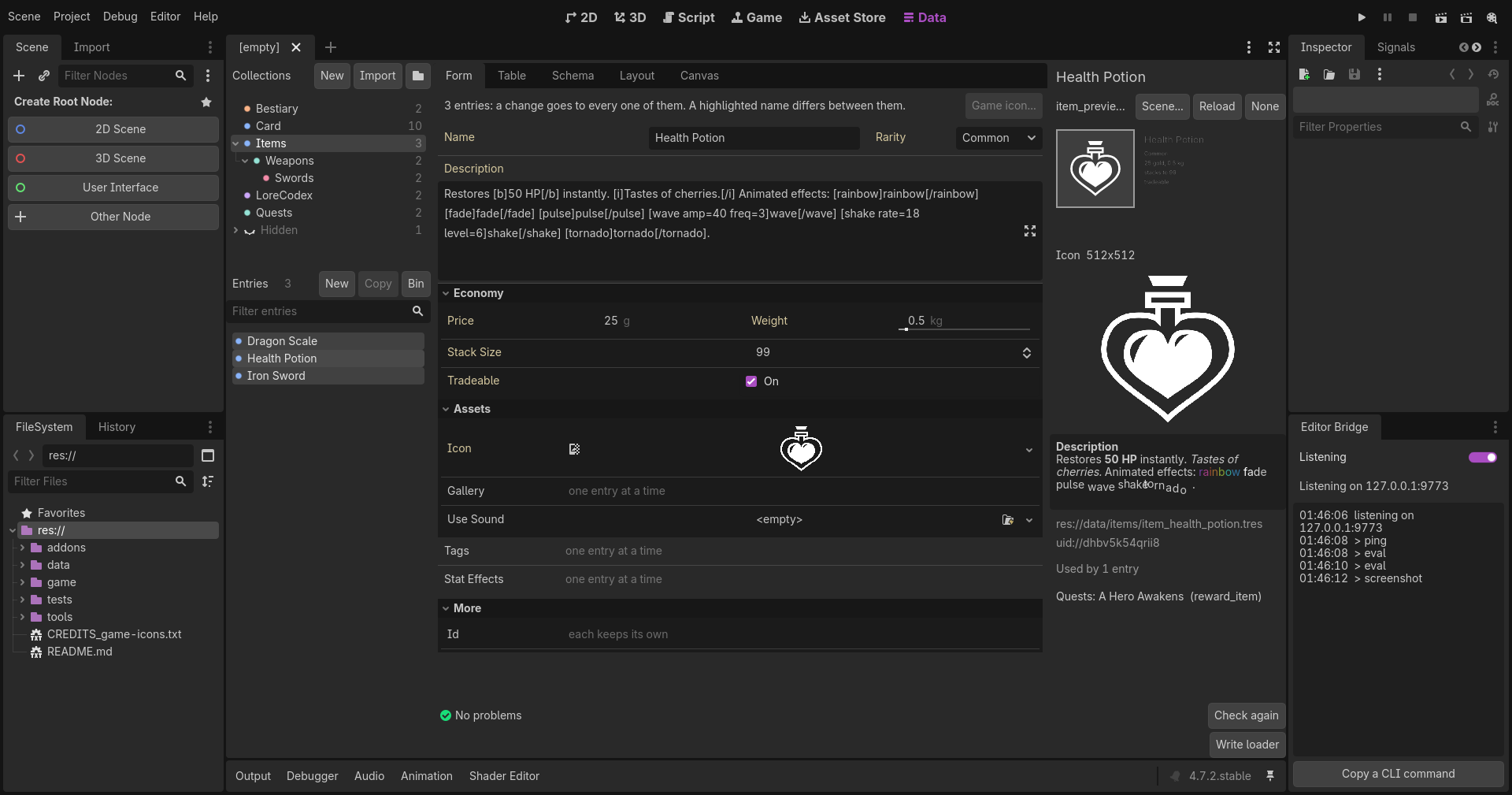
Entries lists the picked collection's entries by their label, each with the collection's dot, and counts them in the header. A label is shown as plain text: a label field holding BBCode loses its tags in every list, and a long one is cut with an ellipsis rather than stretching anything. New makes one (its key by the id mode), Copy duplicates the one shown, rows and all, Bin moves its file to the OS bin. Ctrl or Shift picks several at once, to edit together: the form shows the first one's values and marks a field whose values differ with varies, and a change goes to every one of them as one undo step, which gives each its own value back. The key, lists and groups stay one entry at a time, Copy waits for one, and Bin bins them all after asking. The filter bar above the list speaks a small language, spelled out in its tooltip:
| filter | keeps the entries where |
|---|---|
weight > 3 |
the field compares so; also >=, <, <=, =, != |
rarity = Rare |
the text matches, case ignored |
name contains sword |
the text holds it; a list, each item; a group, each row's texts |
name startsWith fro |
the text starts so |
tags exists |
the field has something in it |
weight > 3, rarity = Rare |
every condition holds |
tags contains silver \| rarity = Rare |
any condition holds |
frog |
a bare word: looked for in every text field |
A field may be named by its label too: Stack Size > 10.
Form
The entry, laid out as the collection's metadata says: rows and columns, sections that fold, a field's width flex or auto, in the order the Layout tab chose. Every field is edited by Godot's own editor for its kind: a range with its unit, an enum, multiline text, a resource picker, and an embedded inspector for a list or a group's rows. A soft reference is picked from the target collection's entries, by label with the key beside it, none first; a key the target lacks is shown as it is and marked, not lost. Fields the layout does not place come last, under More.
A rich text field has a row of buttons above its box: B, I, U, S and code, a colour, a size, the alignment, and under More a link, a picture, lists, an indent, an outline, a background, a tooltip and the effects that move (wave, shake, rainbow, fade, pulse, tornado). Each wraps the selection in its tag, or puts the pair at the caret with the caret between; Ctrl+Z takes it back like any other change.
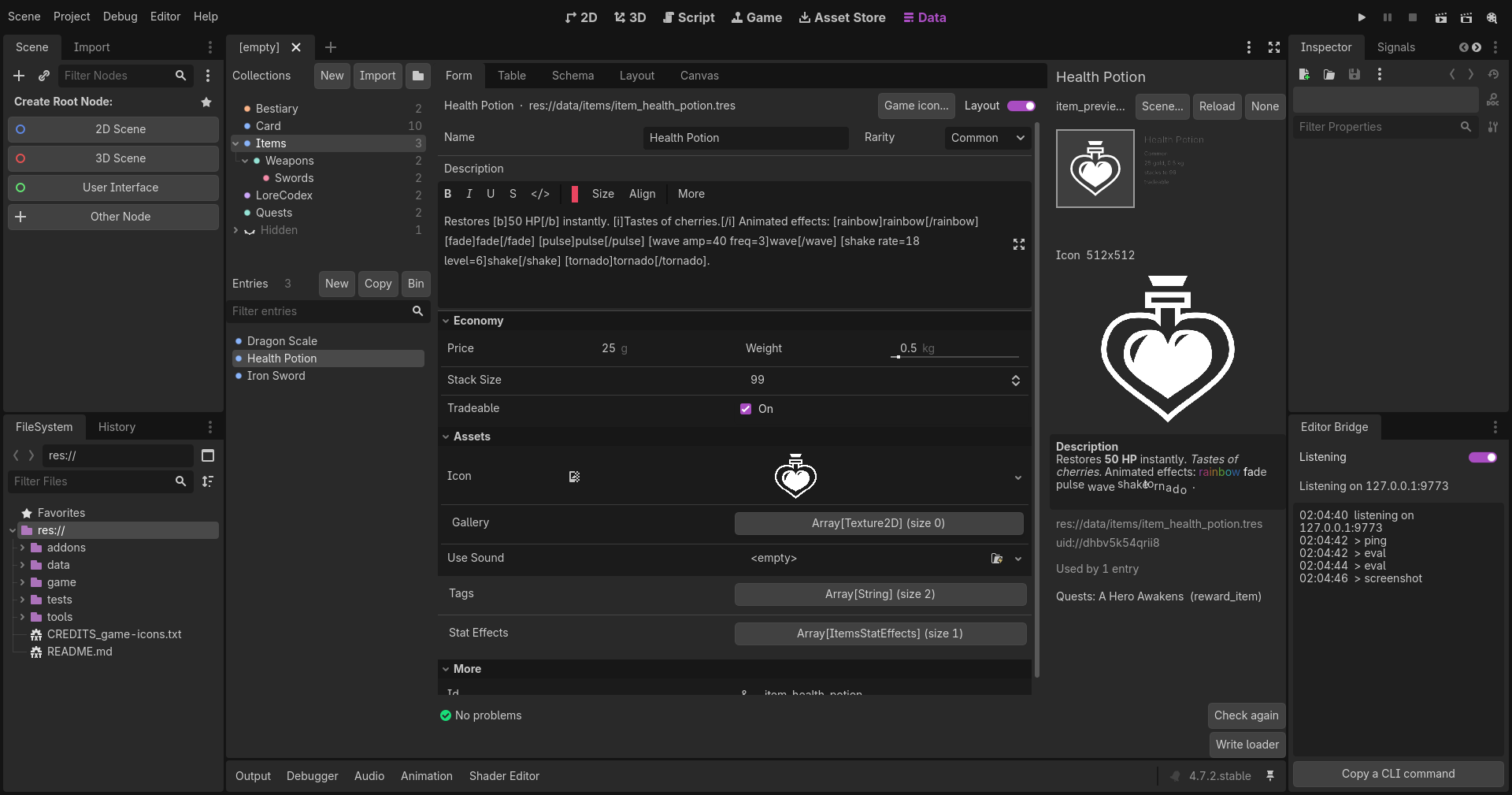
A collection with no layout designed gets a plain column of its fields, in the script's order. Rows are ruled: a hairline under each, one under a row that fields share, none after the last row of a column, so a name and its value read as one row across a wide form.
The Layout switch shows Godot's plain inspector of the entry instead, as Godot draws it, trimmed of the Resource section, with the same picker for soft references.
Every change goes through the editor's undo and is saved to the file at once; letters typed one after another make one undo step, as in Godot's own inspector. A new key renames the file when you are done typing it (you leave the field, press Enter, or pick another entry), unless another entry already has that name, and undoing the key names the file back.
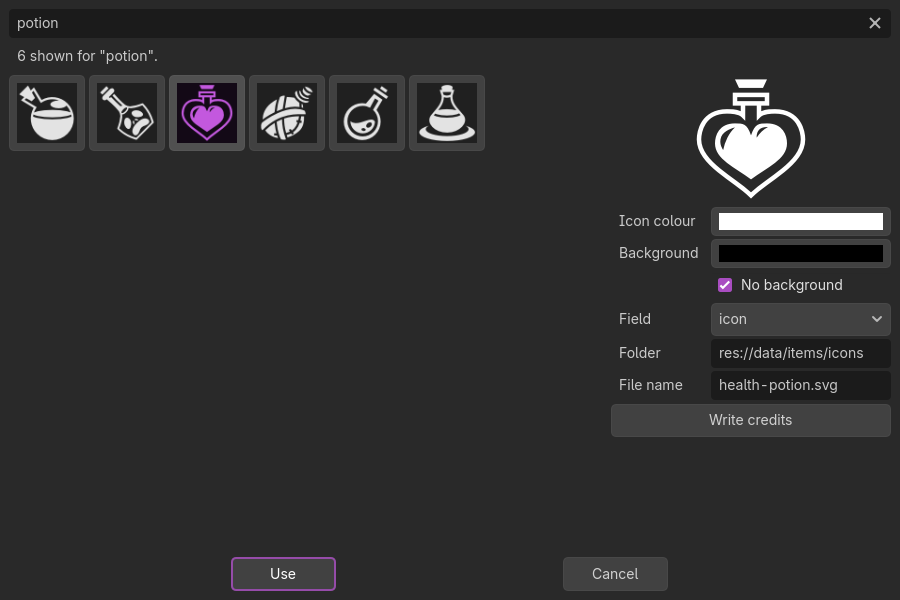
Game icon... opens the game-icons picker: four thousand CC BY 3.0 icons from game-icons.net, searched by name and shown as they arrive, recoloured to the colours you pick or left with no background, saved into the project as an SVG beside the entries (icons/ in the collection's folder) with its credit inside, imported, and set on a picture field of the entry, or added to a list of pictures, as one undo step. The list is fetched from GitHub once and kept in the editor's cache folder, each SVG likewise; a bundled list of 152 stands in when GitHub cannot be reached. Write credits lists every icon in the project with its author in CREDITS_game-icons.txt, which the license asks for.
Table
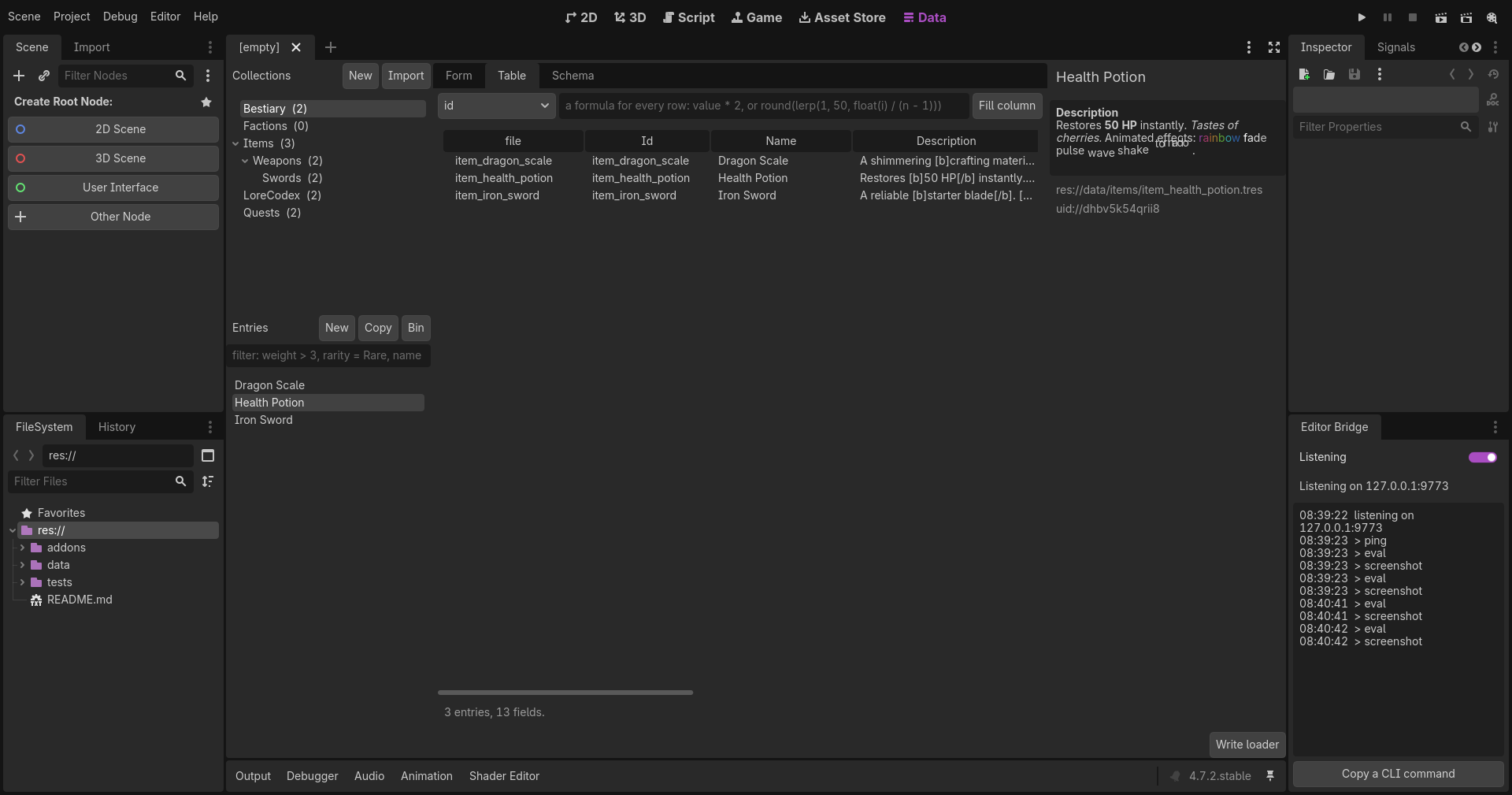
A row an entry, a column a field. Double-click a row to open it in the Form.
- The formula bar fills a column across every entry from an expression over
value,row,iandn:value * 2,round(lerp(1, 50, float(i) / (n - 1))), as one undo action. - Export... writes the collection as a CSV or JSON file. Import... reads one back and shows the plan first. See Import and export.
Schema
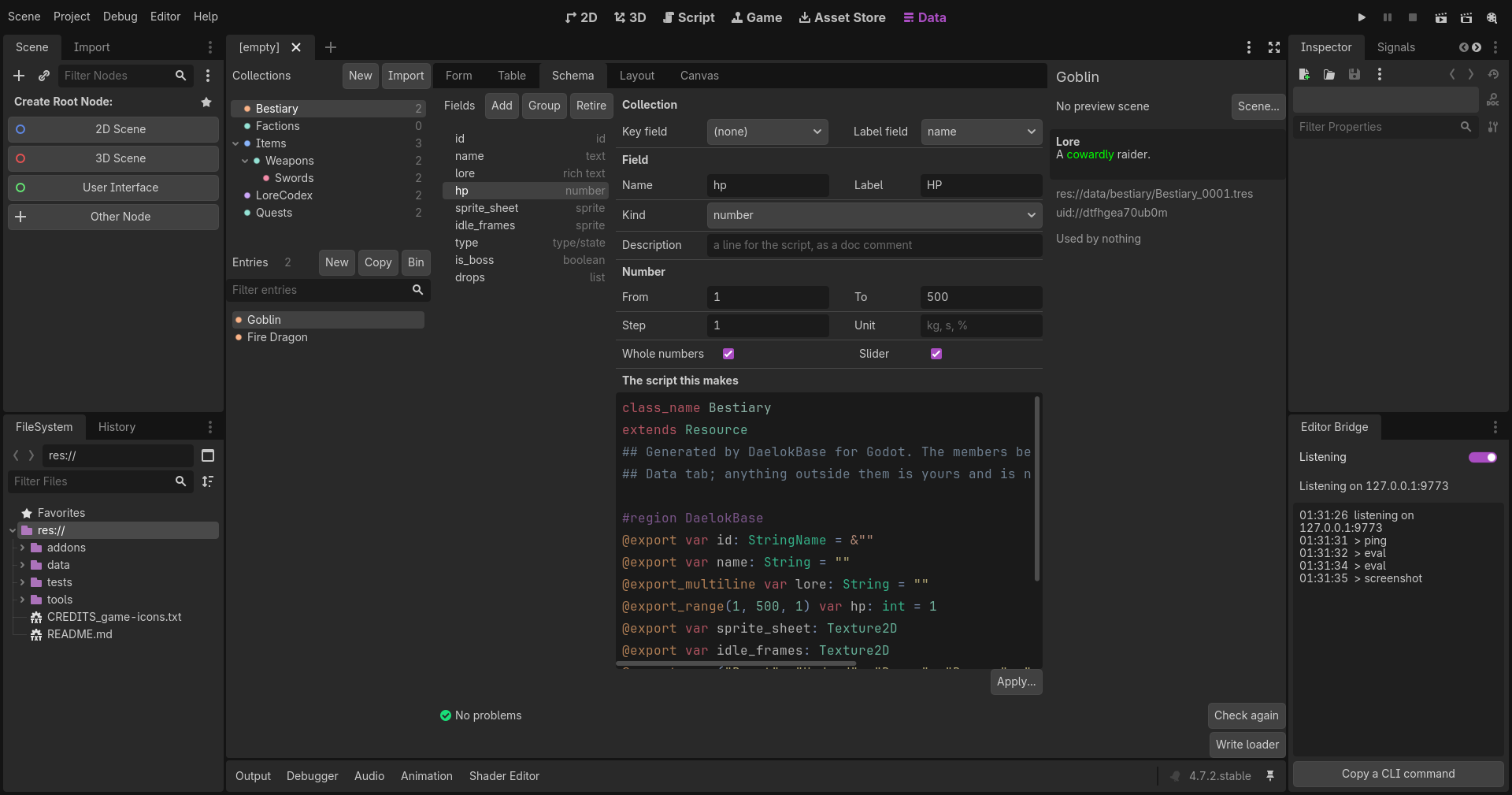
The fields on the left, the kind beside each in plain words: text, rich text, number, boolean, type/state, sprite, sound, list, id, reference, group. On the right, the collection's key and label fields, then the picked field: its name (the variable), its label (what the form shows), a description (a doc comment in the script), its kind, and the rows that kind has and no others. A number has From, To, Step, Unit, Whole numbers and Slider. A type/state has its options, one a line. A list has what it holds and how many at least and at most, and the number rows when it holds numbers. A reference has the collection it points at, picked from the project's, and By key, which makes it hold the entry's key rather than the entry. An id has how it is made (typed by hand, a slug of another field, a counter, a uuid) with its prefix, and the slug's source field and separator or the counter's digits. A sprite has its spritesheet's frames across and down, frames a second and pixel art. A group shows the name of its row class, and its columns under the fields, each edited like a field; Group makes a new one. Under all that, the script the change would make, coloured as the script editor colours it.
Apply shows the migration plan first:
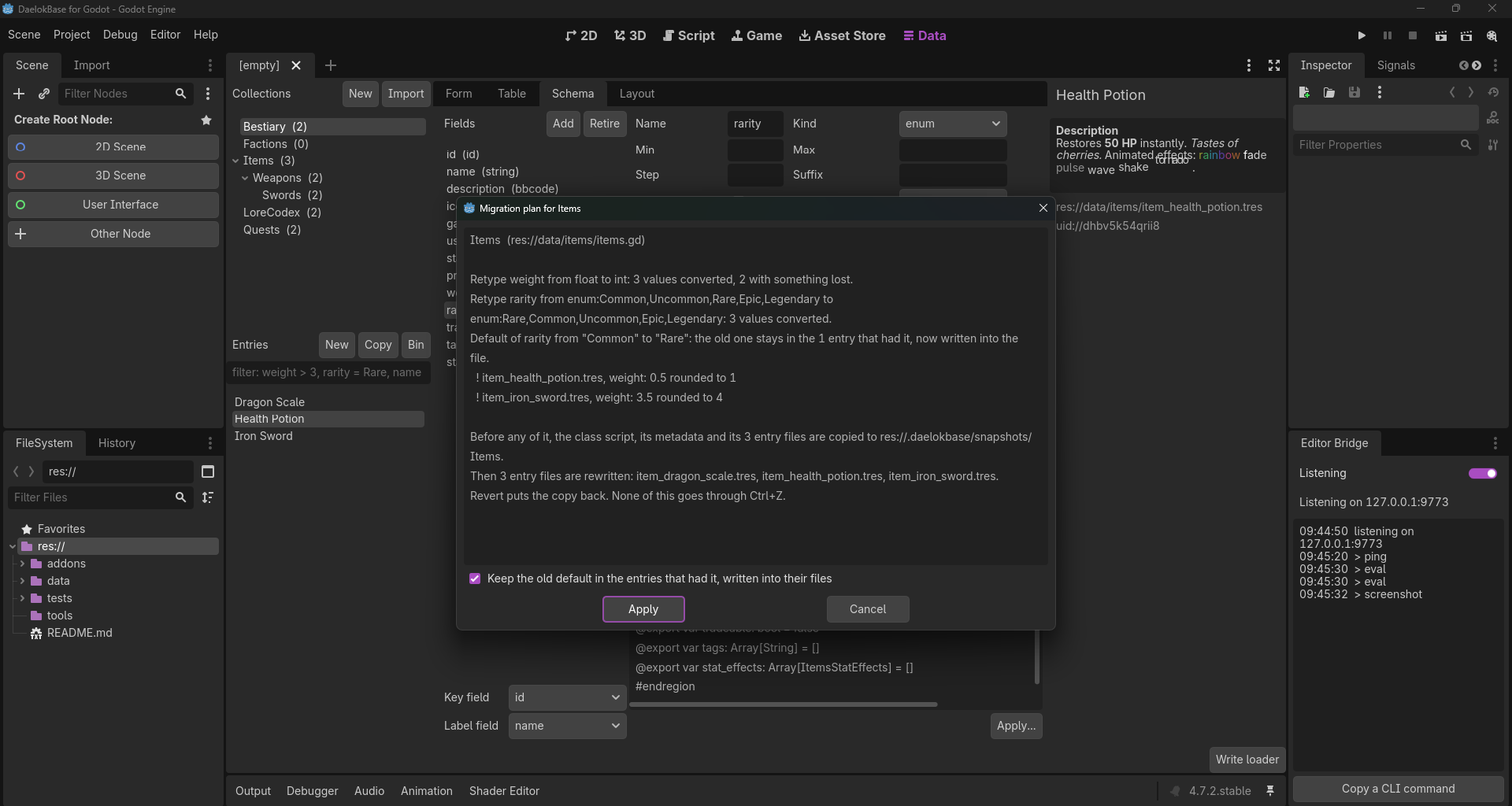
- A renamed field carries its values across.
- A retyped field converts them: a float to a whole number rounds, text to a number parses, a list to text joins at commas, an enum keeps its text. The plan names every entry where something is lost.
- A changed default is the quiet one. Godot never writes a default into a file, so an entry that had the old default would silently take the new one. The plan says how many entries had it, and a tick keeps the old value in them, written into their files.
- A retired field stays in the class as a storage-only member and goes to the retired CSV too. Purge retired takes it out for good.
- A column change is a migration of the row class over every row of every entry, planned and made the same way.
Before any of it, the class script, its metadata and every entry file are copied to a snapshot, and Revert puts the copy back: the class reloaded, every loaded entry re-read from its file. None of it goes through Ctrl+Z.
A class you wrote by hand shows here read-only, with Take over fields: it wraps the script's exports in the region and leaves the rest of the script alone.
Layout
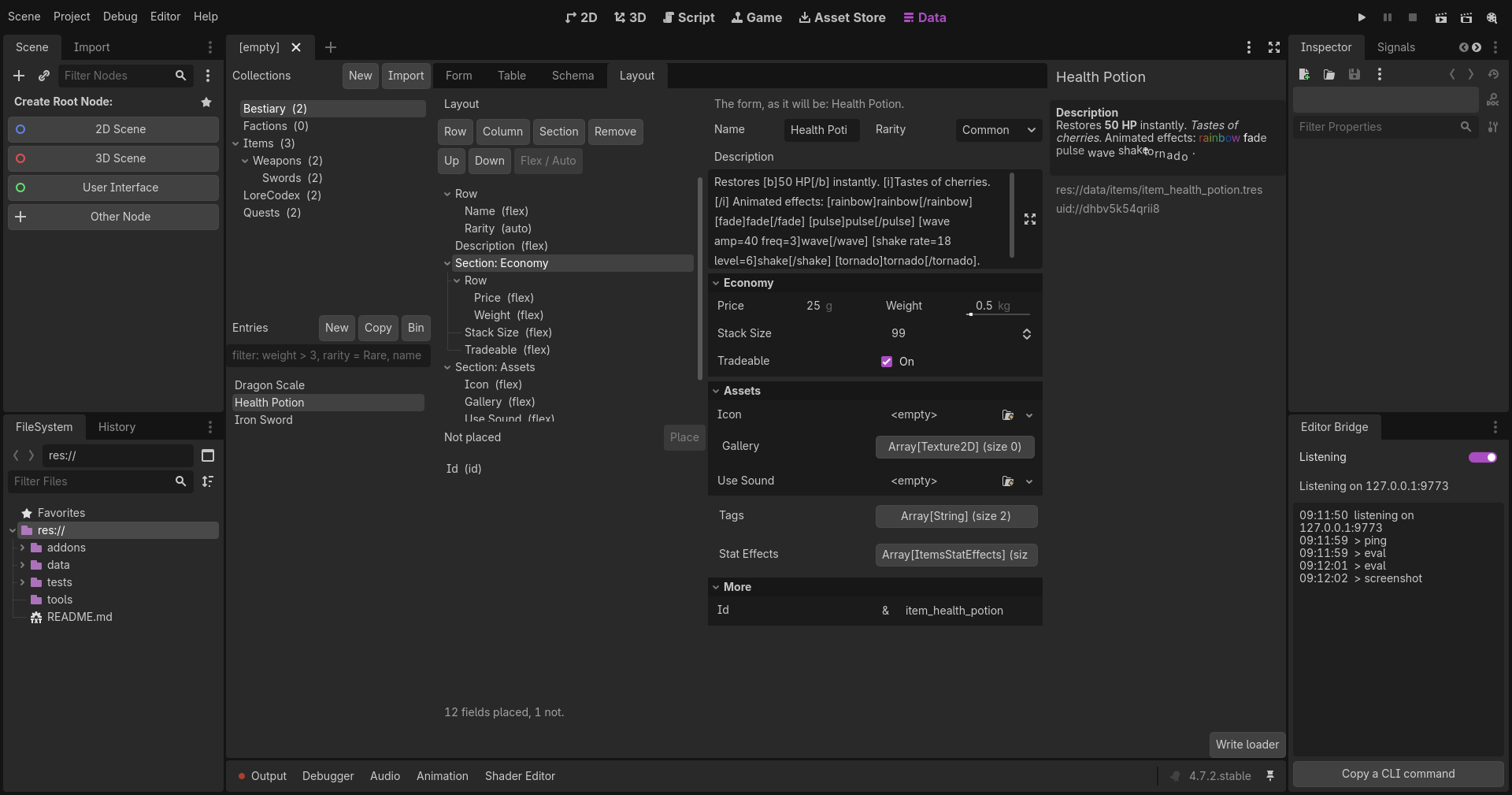
The form's arrangement as a tree: rows, columns, sections and the fields in them. Drag a node onto a container to put it inside, above or below a node to put it beside; drag a field in from the list of the ones not placed, or Place it. Row, Column and Section add containers (double-click a section to name it), Remove takes a node out and moves its contents up into its place, Up and Down nudge, Flex and Auto set a field's width. The form itself sits on the right as a live preview, on the entry picked. Every change is one undo step and is saved to the metadata at once. A collection with no layout starts from a plain column of its fields. The sections go into the class script too, as @export_group lines above their fields, so Godot's own inspector shows the same sections; the fields keep their order in the script, and a script whose region was edited by hand is left alone.
Canvas
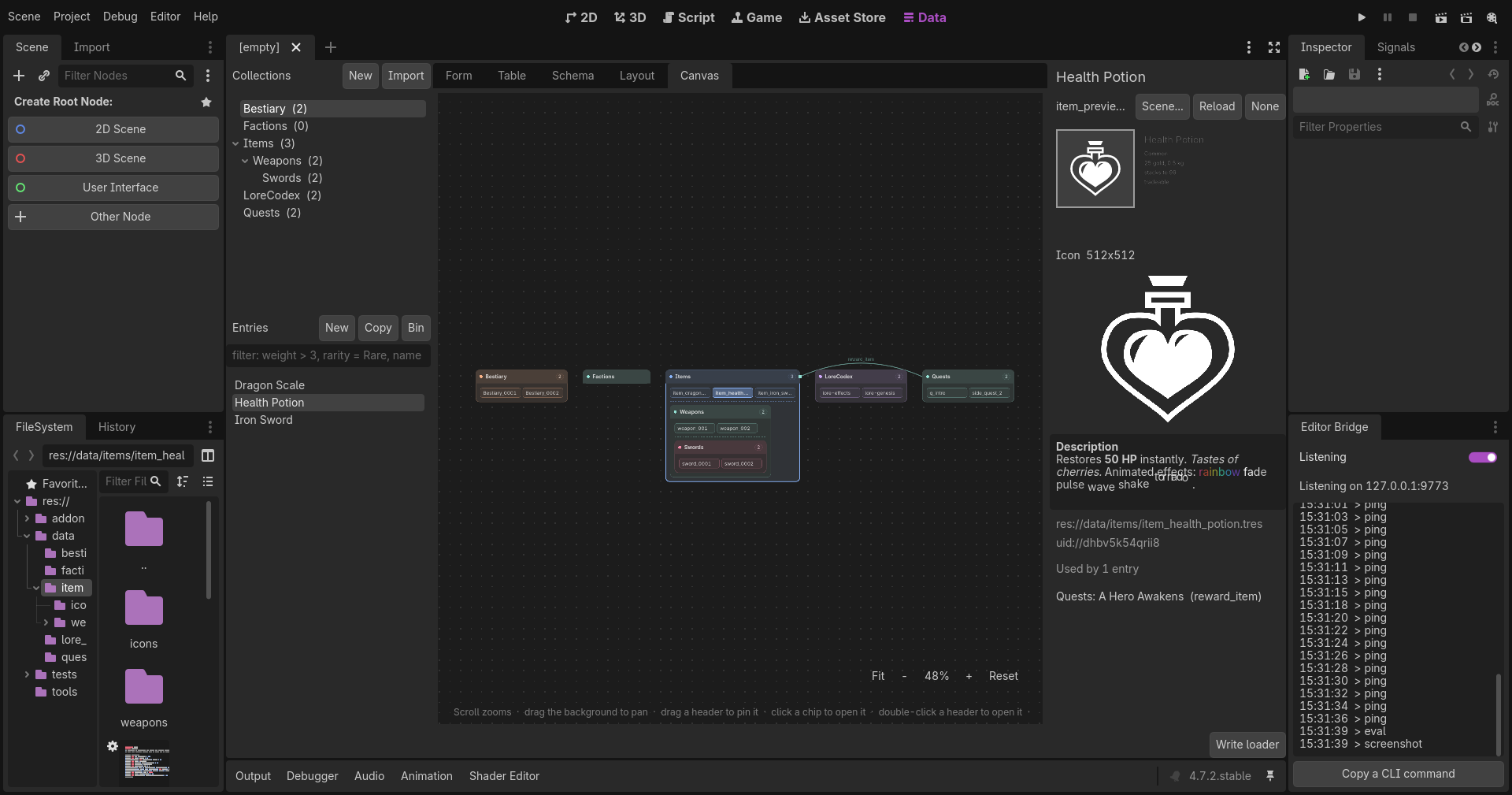
A map of the whole project's data: a box a collection with its entries as chips four to a row, the collections nested in it as boxes inside its body, the roots in a row from the top corner. Scroll to zoom about the cursor, drag the background to pan, drag a collection's header to pin its box where you drop it (kept in the metadata; the pins of an imported Classic project come across), Unpin to let it flow again, F or Fit to see everything. A click on a chip opens the entry in the Form; a click on a header picks the collection, a double-click opens it. A reference field is an arc from its collection to the target's, bowed above the boxes, named, with a dot at the target. Colours come from Classic's hash of the name, so a project brought across keeps them; a color in the metadata wins.
Stage
The collection's preview scene first: a scene of your own, picked with Scene..., drawn in a viewport of its own (its own 3D world, so a 3D scene brings its camera and light), with the entry handed to it whenever the entry shown changes or is edited. The contract is small: the root's script is @tool and has func dlb_preview(entry). data/items/item_preview.tscn in this repository is one, showing an item's icon in a frame coloured by its rarity with its name, price and weight. Reload instantiates it afresh after you edit it, None takes it away, and a scene that cannot take an entry is told what it lacks.
Then the entry's textures (a spritesheet stepped through its frames when the field says how many), its sounds with a Play button, its BBCode drawn by a real RichTextLabel (a font named rather than a file of the project is dropped, an image on the web becomes its address), its file and its UID, and Used by: every entry of every collection that points at this one, by a soft reference holding its key or a hard one holding its file, a button each that goes to it.
Problems
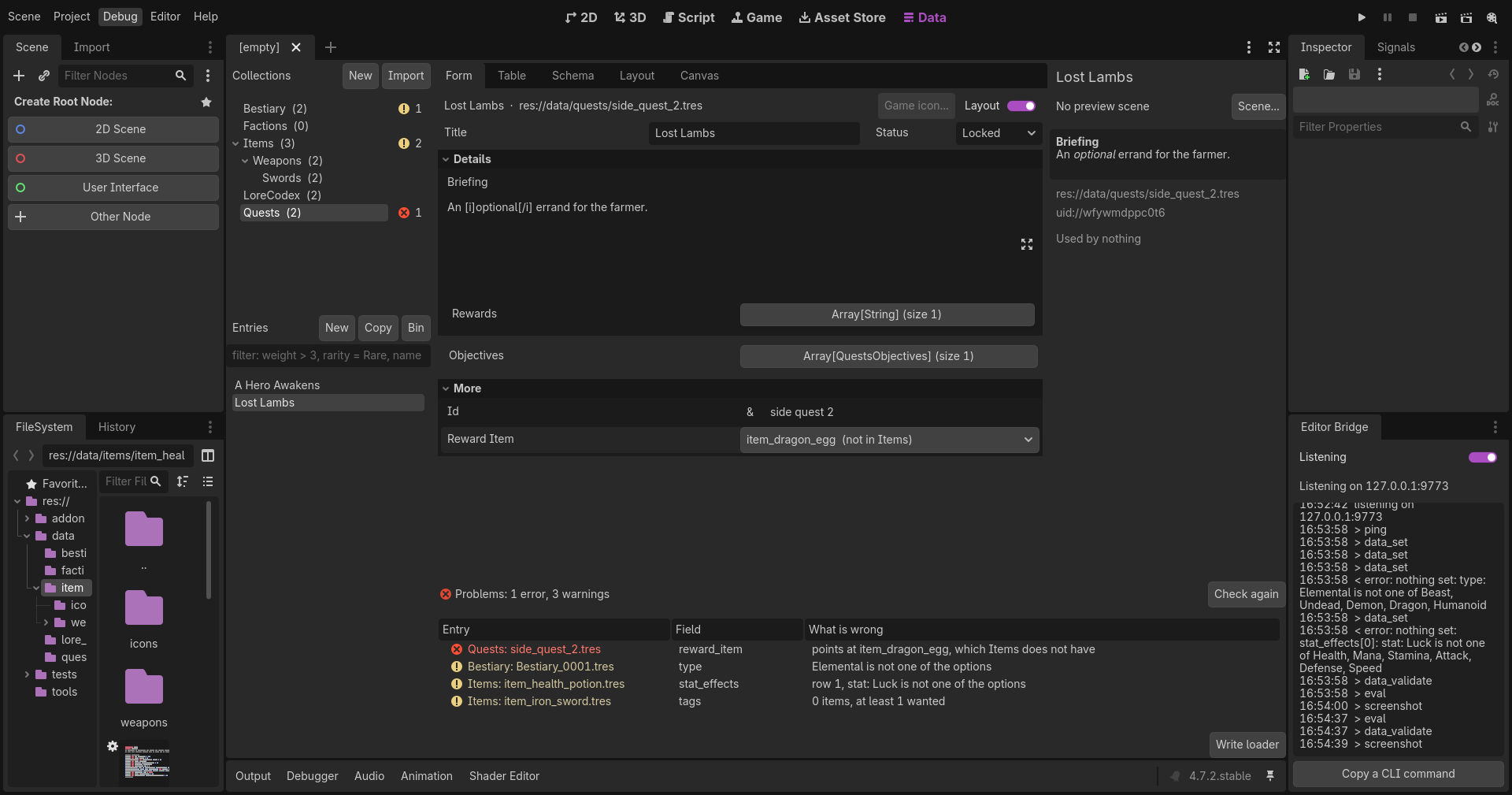
Under the views, what the validator finds in every collection:
- a key that repeats or is empty;
- a file named unlike its key;
- a list with fewer or more items than its limits;
- an enum value outside its options, in a group's rows too;
- a soft reference to a key the target does not have, in a group's rows too;
- an entry that does not load.
A row a problem, errors first, with the entry, the field and what is wrong. A click goes to the entry in the Form with the field picked out, bringing the Data tab to the front if it was not. Each collection in the tree wears its count as a badge. The checks run again after every save and every bridge command, and on Check again; the header folds the list away.
In the FileSystem dock
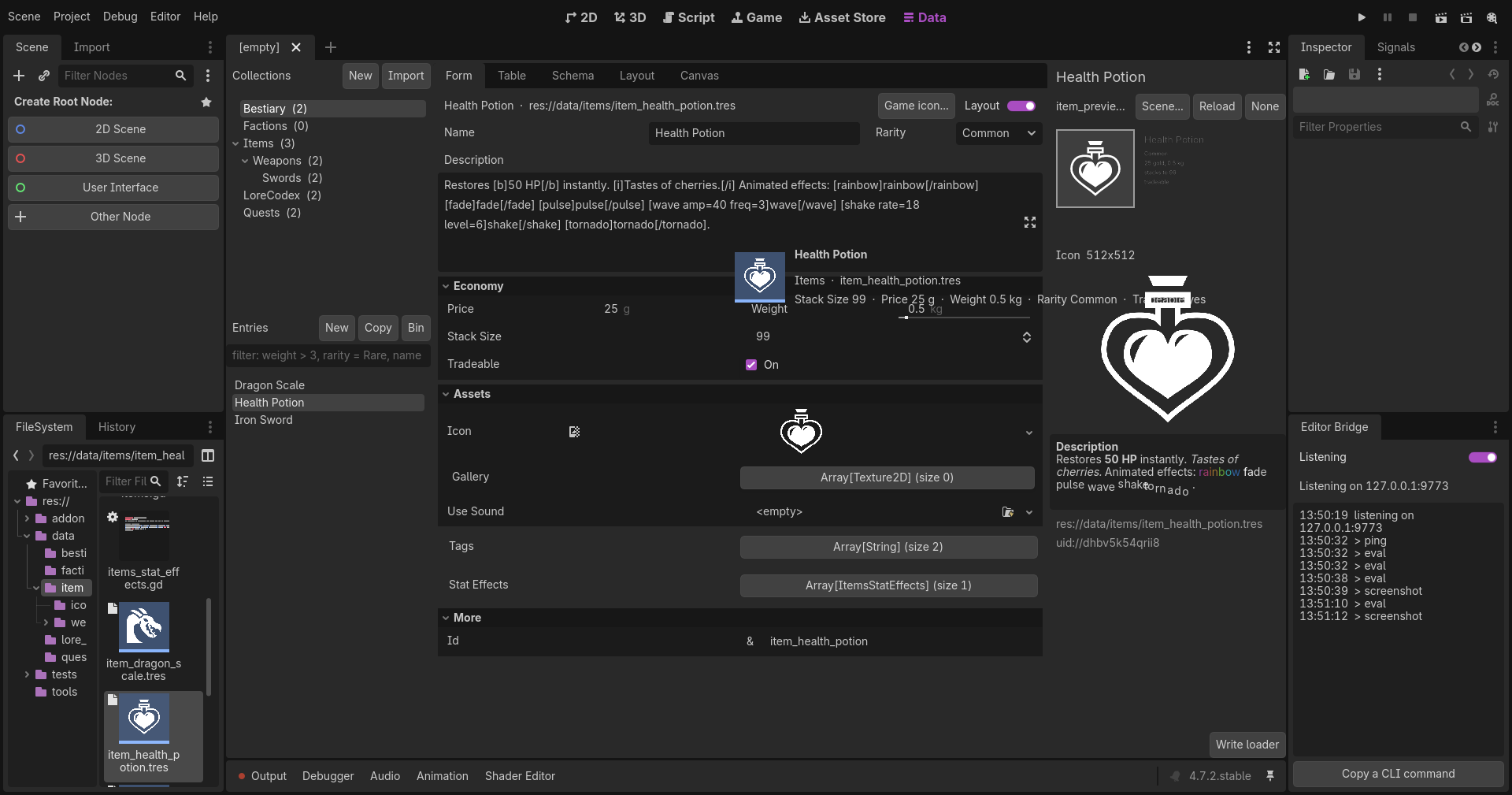
Every entry file gets a thumbnail: a card with the entry's first picture, or its label's initials, on the collection's colour. Hovering the file shows a card with its label, its collection and a few of its values above the editor's own lines. The right-click menu offers Open in DaelokBase, which brings the Data tab to the front with the entry in the Form.
Write loader
A menu of three kinds of code that loads the entries in the game, each written beside them and yours: Folder loader (relic_db.gd, RelicDb.all(), get_by_key(), keys(), get_by_file(), copy_of(), refresh(), reading the folder and the folders under it when first asked, so a new entry needs nothing written again), Key constants (relic_keys.gd, a constant a key, each entry loaded by its uid when asked for) and Catalog (relic_catalog.tres, one resource holding them all). See Getting started.