Import and export
A DaelokBase Classic project
Import, beside Collections, takes a .dlb (or the JSON inside it) and a root folder, and shows the plan before writing anything: a class and a folder a collection, nested collections in nested folders, every field as an export with its range, unit, options or item type, every Repeating Group as a row class and a typed array of inline sub-resources (the rows every Classic exporter used to drop come across too), the key and label fields, the layout, and every entry as a .tres named by its key. Pictures and sounds are pointed at by their res:// paths and picked up when the files are there. Names become Godot's: Use Sound is use_sound, Lore Codex is LoreCodex, and a name Godot reserves gets an underscore.
| Classic | here |
|---|---|
| string, bbcode | String, @export_multiline String |
| number | float, or int when whole; @export_range(min, max, step, "suffix:kg"), or_greater when open |
| enum | @export_enum("A", "B") var x: String, storing the option text |
| boolean | bool |
| path (a picture, a spritesheet) | Texture2D; frames and speed in the metadata, for the Stage |
| audio | AudioStream |
| array | Array[String], Array[float], Array[Texture2D]; item limits checked by the validator |
| id | StringName; slug, counter and uuid modes fill it in on New |
| key, label | the file name; the entry's name in the list |
| nested collection | a nested folder (a class may extends another, and then nests in the tree) |
| Repeating Group | a row class and Array[RowClass] of inline sub-resources |
| layout | kept in the metadata (sections, rows, widths) |
| canvas pins | kept in the metadata |
A collection out, as CSV or JSON
Export... on the Table tab writes the collection shown to a file you pick, anywhere on disk. The format follows the extension.
CSV. The first line names the fields, in the metadata's order; then a row an entry, in file order. Text is written as it is, quoted when it holds a comma, a quote or a line break. true and false for booleans. A picture or a sound is its path. A list is its items joined by |. A group's rows, or a list that holds | or maps, are written as JSON inside the cell.
id,name,price,tags,stat_effects
item_health_potion,Health Potion,25,potion|healing,"[{""stat"":""Health"",""operation"":""add"",""value"":50}]"
JSON. A list of maps, a map an entry, the same values as above with a list a list and a group's rows a list of maps.
[
    {
        "id": "item_health_potion",
        "name": "Health Potion",
        "price": 25,
        "tags": ["potion", "healing"],
        "stat_effects": [{"stat": "Health", "operation": "add", "value": 50}]
    }
]
DaelokBase Classic reads that shape.
Rows in, from CSV or JSON
Import... on the Table tab reads a file back into the collection shown. A JSON file may be a list of maps, a map of key to map (the key is folded into the key field), or either of those under the collection's name, which are the shapes Classic writes. A CSV is read as above: a list split at |, JSON in a cell parsed, true/false read, and an empty cell meaning an empty list or an empty text, but nothing at all for a number, an enum or a boolean, which stay as they are.
Each row is matched to an entry by the key field:
- a known key updates that entry, and only the columns the file has;
- a new key, or an empty one, makes an entry, keyed by the id mode when the file gives none;
- a column that is no field is left out;
- a cell that will not convert (a word where a number should be, an option the enum lacks, a file the project does not have) is left as it is, and named.
The plan is shown first, in words:
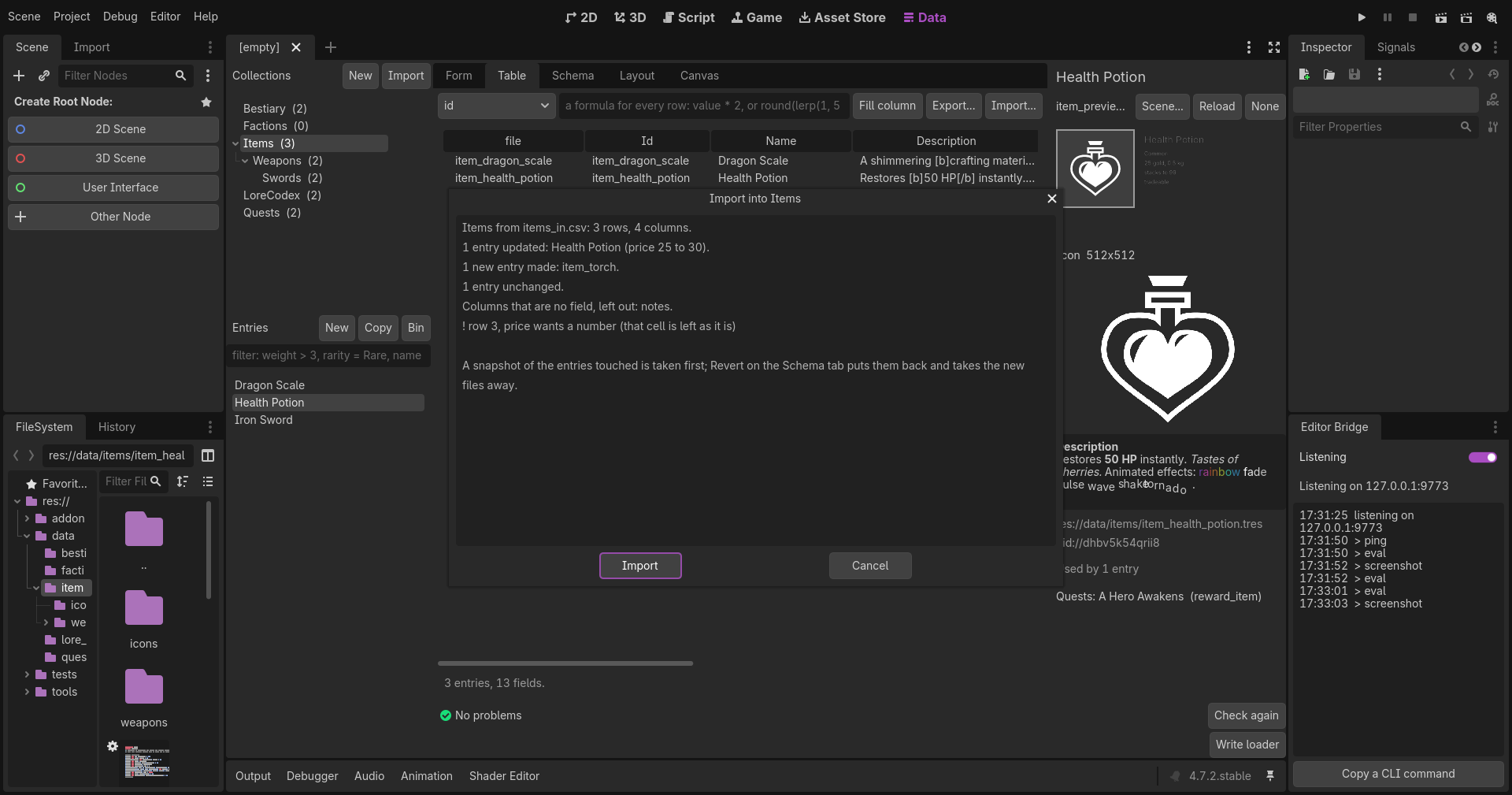
Items from items_in.csv: 3 rows, 4 columns.
1 entry updated: Health Potion (price 25 to 30).
1 new entry made: item_torch.
1 entry unchanged.
Columns that are no field, left out: notes.
! row 3, price wants a number (that cell is left as it is)
Import then writes it: the updated entries saved, the new files made. A snapshot of the entries touched is taken first, and it notes the files the import made, so Revert on the Schema tab puts the old values back and takes the new files away, to the OS bin.
A collection with no key field cannot match rows, so every row makes an entry there.
Through the bridge, data_export and data_import_rows do the same, the latter with a file or with rows given inline. See Through the Editor Bridge.